Poly
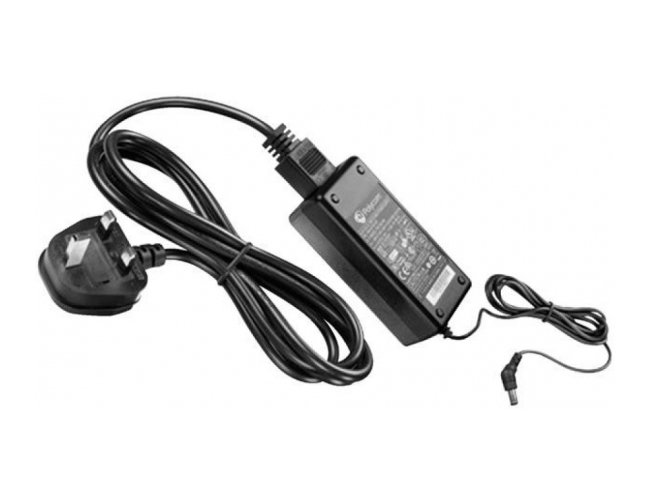
Poly VVX 301, 311, 401 and 411 Power Supply 48V 0.38A UK Plug
- 48V, 0.38A
- UK
- Poly VVX 301, 311, 401, 411
£35.99

The UK's traditional analogue and ISDN phone network is being retired. For hotels, that affects more than the reception phone. This guide explains what to check and what a modern hotel phone system should do.
Many hotels still run a phone system that was installed years ago and connects to the outside world over traditional copper phone lines or ISDN. That network is being switched off across the UK and replaced by digital, internet-based calling. If your hotel has not planned for it yet, now is the time, because the phone lines often carry more than phone calls.
The Public Switched Telephone Network (PSTN) is the traditional analogue phone network, and ISDN is the older digital service many businesses use for multiple lines. Both are being withdrawn and replaced by services that carry calls over broadband (often called VoIP or SIP).
Openreach stopped selling new traditional lines nationally in September 2023, and BT has said it will complete the move of its customers off the old network by January 2027. Other providers follow their own timetables, so ask your current provider for the date that applies to your lines.
The internal wiring from your phone system to the guest rooms is not switched off. What changes is how the system connects to the outside world.
This is the step hotels most often miss. Before you change anything, list every device that relies on a phone line. In hotels these commonly include:
Each one needs a tested digital alternative before its line is migrated. Speak to the companies that maintain your lifts and alarms early, as they may need to replace or reconfigure equipment.
A hotel phone system is not an office phone system. When you compare options, check these hotel-specific features:
Our page on PMS integration explains how the phone system connects to the PMS and the other hotel systems around it.
Digital phone lines depend on your internet connection and on power. A hotel cannot be without phones, so plan for both:
Room phones are still used for housekeeping codes, reception calls, wake-up calls and emergencies, even though most guests carry mobiles. Decide which rooms need a phone, whether it should be an IP handset or an adapter that lets the existing room phones work, and how they are powered. Handsets powered over the network cable (PoE) reduce the number of power points you need.
For staff who move around the building, cordless DECT handsets with enough base stations to cover back-of-house, corridors and stairwells are usually more reliable than WiFi handsets, because they are designed for voice. Ask for a coverage survey with test calls rather than a paper plan alone.
If you charge for calls, check that the system records them accurately and passes the charges to the PMS. Ask how wake-up calls are set, who can change them and whether failures are reported to reception. Ask for reports on missed calls at reception and at the restaurant. Seeing how many calls go unanswered is often the best argument for a call queue or a better out-of-hours route.
Whatever system you choose, calls to 999 and 112 must work from every phone, including when the internet is down. Ask the supplier how emergency calls are routed, what location information is sent and how this is tested. For a building with many rooms, the caller's room or area should be identifiable. Include lift phones, fire alarm diallers and any other life-safety device in the same plan, and test each one after the change.
Ask who will port your existing numbers, how long it takes and what the fall-back is if it goes wrong. A good cut-over plan chooses a quiet period, keeps the old route available until the new one is proven, and has a named person at the hotel and at the supplier during the change. Tell guests and key contacts only what they need to know, such as any temporary number.
Not always. Some existing systems can be connected to digital lines through a gateway, which may be a sensible interim step. Whether it is worth it depends on the age of the system, its features and the support available for it. A survey should give you the options side by side.
Usually yes. Numbers can normally be moved to a new provider, but the process takes planning, so start early.
Typically not. Room phones work as before, and guests use the same codes to reach reception or room service. The change happens behind the scenes.
Plan for it. A second connection or a mobile backup, power protection for the phone system and network, and a divert to mobiles for key numbers keep reception reachable.
Our hotel voice and telephony service covers IP phone systems, SIP trunks, DECT handsets and PMS call billing, with the network and cabling handled by our network and cabling teams. You can request a quote or book a visit to review your current lines.
We will list every device that uses your phone lines, check your current system and give you a clear, written migration plan.
We also sell this kind of hardware, with UK stock and tracked delivery. See all voip or browse the shop.